Blog · A home network run like a small office
Who's knocking: a security tab in two evenings
What the attempts against my house look like, and what I built to watch them.
In this series · Chapter 7, SecurityShow all 49 partsHide the list
1. Where it started
- 01Why I'm running my home like a small office
- 02What a read-only audit of my network found
- 03The first changes, and the ones I said no to
- 04Reuse first, build only what's missing
- 05Fifteen decisions before the first line of code
2. Remote access and keys
- 06One way in from outside
- 07An address that keeps itself up to date
- 08Where the passwords live
- 09Keys that can do one thing
3. Monitoring
- 10Is it my network or the internet provider?
- 11A watcher outside the house, and backups I've restored
- 12The drill that found the bug
- 13Alerts that only reach my phone when something needs me
- 14I had the monitor audit itself
- 15Teaching the hub to stop crying wolf
4. The network redesign
- 16"Don't take down my internet": the routine before every change
- 17The firewall upgrade, two days late
- 18Keeping the plan when the builder wanted to drop it
- 19Two Wi-Fi drops, and knowing when to stop
- 20The router at 90 percent
- 21Moving 40 gadgets without touching each one
5. The media server
6. The control center
- 24An overnight prototype, and bars instead of dials
- 25A nice hub, tucked away in a drawer
- 26Instructions for a phone I don't own
- 27Three checks before anything goes live
- 28Buttons with a seatbelt
- 29Rewind: replaying a Wi-Fi outage
- 30"I just want a more sensible layout"
7. Security
- 31A security scoreboard that started at a D
- 32Who's knocking: a security tab in two evenings
- 33Matching every program to the public flaw lists
- 34A DNS log for the house
- 35A weekly scan that can't annoy anyone
- 36The week of the scary flaw list
8. A private AI assistant
9. How the work got done
- 38Keeping a non-developer in charge
- 39A house manual that rebuilds itself every night
- 40My AI assistant keeps blocking itself, and I'm glad
- 41What it cost, what's next, and what I'd bring to an office
10. After the rebuild
- 42The backup that filled its own disk
- 43Two messages, one second, wrong order
- 44My help tool said "fine" at 7 megabits
11. Groceries
On October 18, I pushed back on the hub. The project map was a day out of date, a device list said every device had an owner when it didn't, and I wasn't sure what to trust. I told the assistant, "This hub is only going to be as good as how accurate it is." Then I asked a bigger question: should this be a security monitoring system for my house too?
Accuracy first
The assistant fixed the map and changed "Every device has an owner" to what was true: "65 of 69 devices have a known owner." Small, but it's the kind of claim that, once caught being wrong, makes you doubt everything else on the screen.
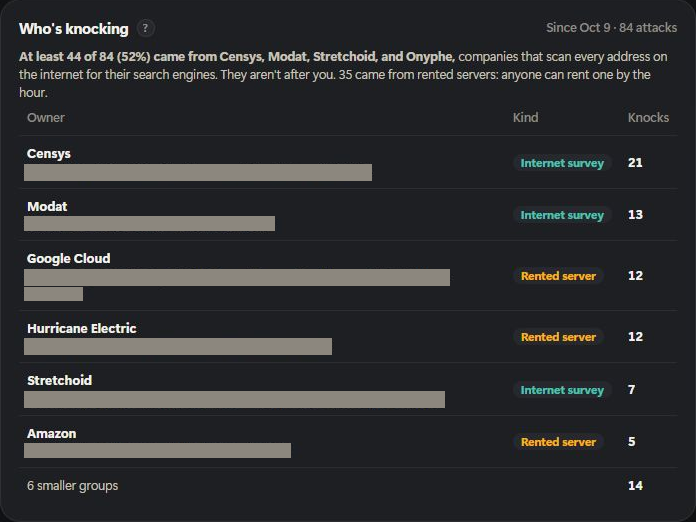
Who's knocking
Then it read the router's logs. Since October 9, there had been 84 blocked attempts to get in. They came from 74 different addresses, mostly in the US and Canada, 3 to 17 a day. No device in the house had been blocked trying to reach out. That last number matters most. It means nothing inside was behaving like it had been taken over.
Free lookups of who owns those addresses showed that somewhere between 40 and 52 percent belonged to internet survey companies, the firms that scan the whole internet and sell the results. The rest were unknown. This is what the background noise of the internet looks like for any address, including a small office's.
Three layouts, one pick
The assistant mocked up three ways to show this: one long page, the log as the page, or five small tabs. I said, "I like C, go for it." It was built in 45 minutes:
- A security log you can filter.
- Eight read-only checks that rerun on demand.
- Four alerts that are always urgent, including a house device reaching a known-bad address, a router sign-in from a new place, and a new way into the house opening up.
Before it went live, the assistant caught a false "sign-in from a new place" alert the first live read would have sent.
"Be ambitious"
The next evening, I asked for more. I wanted a fully featured security dashboard, and I asked what security companies offer that I didn't have. I said, "Be ambitious."
The result: a verdict strip at the top, six summary tiles, a chart that plots each known flaw by how severe it is against how likely it is to be used, and a Done button for each item, with a 7-day undo and a sealed log. A roadmap page compared 12 things security companies sell with what the house has.
Two of my ideas got honest answers. A decoy facing the internet: no, it invites attention you don't need. And an AI agent watching around the clock in the cloud was ruled out, because the hub doesn't send house data to cloud AI.
A to-do list, not a wall of red
Two days later, the security page became a to-do list. Every red item comes with its fix. Yellow items turn red after a set time, like 14 days for a serious flaw with a fix available, or 2 days for a failed backup. My phone gets one alert when something first turns red, and that's it.
Looking at my own firewall logs once made the risk feel real, and seeing zero outbound blocks was reassuring. But a list is what gets worked. A wall of red gets ignored.