Blog · A home network run like a small office
I had the monitor audit itself
Thirty incidents in a week, one real outage, and a counter that counted twice.
In this series · Chapter 3, MonitoringShow all 49 partsHide the list
1. Where it started
- 01Why I'm running my home like a small office
- 02What a read-only audit of my network found
- 03The first changes, and the ones I said no to
- 04Reuse first, build only what's missing
- 05Fifteen decisions before the first line of code
2. Remote access and keys
- 06One way in from outside
- 07An address that keeps itself up to date
- 08Where the passwords live
- 09Keys that can do one thing
3. Monitoring
- 10Is it my network or the internet provider?
- 11A watcher outside the house, and backups I've restored
- 12The drill that found the bug
- 13Alerts that only reach my phone when something needs me
- 14I had the monitor audit itself
- 15Teaching the hub to stop crying wolf
4. The network redesign
- 16"Don't take down my internet": the routine before every change
- 17The firewall upgrade, two days late
- 18Keeping the plan when the builder wanted to drop it
- 19Two Wi-Fi drops, and knowing when to stop
- 20The router at 90 percent
- 21Moving 40 gadgets without touching each one
5. The media server
6. The control center
- 24An overnight prototype, and bars instead of dials
- 25A nice hub, tucked away in a drawer
- 26Instructions for a phone I don't own
- 27Three checks before anything goes live
- 28Buttons with a seatbelt
- 29Rewind: replaying a Wi-Fi outage
- 30"I just want a more sensible layout"
7. Security
- 31A security scoreboard that started at a D
- 32Who's knocking: a security tab in two evenings
- 33Matching every program to the public flaw lists
- 34A DNS log for the house
- 35A weekly scan that can't annoy anyone
- 36The week of the scary flaw list
8. A private AI assistant
9. How the work got done
- 38Keeping a non-developer in charge
- 39A house manual that rebuilds itself every night
- 40My AI assistant keeps blocking itself, and I'm glad
- 41What it cost, what's next, and what I'd bring to an office
10. After the rebuild
- 42The backup that filled its own disk
- 43Two messages, one second, wrong order
- 44My help tool said "fine" at 7 megabits
11. Groceries
On October 15, I asked a simple question: what do the 8,152 errors on one of the router's ports mean? The answer led to an audit of the monitoring itself, and it was humbling.
The errors that weren't
A read-only look at that port showed the errors were counted twice. There were 8,155 dropped frames and 8,152 "errors," and they were the same events. Together they came to 0.023 percent of 35.5 million frames. The count had been flat for 23 hours, and nothing showed on the sending side. It wasn't a bad cable.
Worse, the hub's own math was wrong. When the chart tool gained a new label, the hub's calculation of "how much has this grown" counted the whole history again. It showed 12,869 when the real increase was about 4,800.
The fix replaced raw numbers with a plain verdict for each port: Clean, Harmless drops, or "Errors: check the cable." A number nobody can interpret is worse than no number, because it makes people worry or makes them ignore numbers.
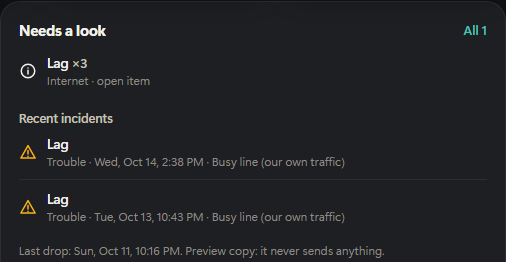
Thirty incidents, one outage
Then the assistant looked at a week of incidents. The hub had logged 30. Only one was a real outage, and that was my own drill, when I unplugged the modem on purpose. Three rules produced 23 of the 30. None of them had reached my phone, so the alert rules were doing their job, but the incident list was mostly noise.
There was a subtler problem. The hub had counted my drill as an outage caused by the provider. It showed up in the uptime numbers, and it would have been cited in the script I'd use when calling the provider. I'd have been complaining about my own test.
A crash waiting to happen
The audit also found a bug nobody had hit yet. If two scheduled speed tests were skipped in a row, the hub would raise an error every 20 seconds and quietly stop detecting incidents. Nothing would look wrong. The monitoring would just stop.
And the hub kept no logs across releases. There had been 18 releases in five days, and each one wiped the logs from before it.
The fixes
- A Mark as ours button, so drills and planned work don't count against the provider.
- Incidents close on their own after three quiet days.
- The speed test bug fixed, along with the audit's other stability fixes.
- Logs that survive restarts and releases.
Lessons learned
Monitoring needs auditing like anything else. I look at how many alerts last month were real, whether planned work is labeled as ours, and whether I'd notice if the monitoring itself stopped. Silent monitoring looks exactly like a quiet month.