Blog · A home network run like a small office
A private AI for the house that can't touch anything
Two models, 20 real questions, and the safeguards I wanted before any of it went live.
In this series · Chapter 8, A private AI assistantShow all 49 partsHide the list
1. Where it started
- 01Why I'm running my home like a small office
- 02What a read-only audit of my network found
- 03The first changes, and the ones I said no to
- 04Reuse first, build only what's missing
- 05Fifteen decisions before the first line of code
2. Remote access and keys
- 06One way in from outside
- 07An address that keeps itself up to date
- 08Where the passwords live
- 09Keys that can do one thing
3. Monitoring
- 10Is it my network or the internet provider?
- 11A watcher outside the house, and backups I've restored
- 12The drill that found the bug
- 13Alerts that only reach my phone when something needs me
- 14I had the monitor audit itself
- 15Teaching the hub to stop crying wolf
4. The network redesign
- 16"Don't take down my internet": the routine before every change
- 17The firewall upgrade, two days late
- 18Keeping the plan when the builder wanted to drop it
- 19Two Wi-Fi drops, and knowing when to stop
- 20The router at 90 percent
- 21Moving 40 gadgets without touching each one
5. The media server
6. The control center
- 24An overnight prototype, and bars instead of dials
- 25A nice hub, tucked away in a drawer
- 26Instructions for a phone I don't own
- 27Three checks before anything goes live
- 28Buttons with a seatbelt
- 29Rewind: replaying a Wi-Fi outage
- 30"I just want a more sensible layout"
7. Security
- 31A security scoreboard that started at a D
- 32Who's knocking: a security tab in two evenings
- 33Matching every program to the public flaw lists
- 34A DNS log for the house
- 35A weekly scan that can't annoy anyone
- 36The week of the scary flaw list
8. A private AI assistant
- 37A private AI for the house that can't touch anything
9. How the work got done
- 38Keeping a non-developer in charge
- 39A house manual that rebuilds itself every night
- 40My AI assistant keeps blocking itself, and I'm glad
- 41What it cost, what's next, and what I'd bring to an office
10. After the rebuild
- 42The backup that filled its own disk
- 43Two messages, one second, wrong order
- 44My help tool said "fine" at 7 megabits
11. Groceries
I wanted an AI in the house that could answer questions like "Is anyone streaming right now?" or "Why was the internet slow last night?" I didn't want it sending anything about my home to a cloud service, and I didn't want it changing anything. On October 13, I asked for it with one condition: "Research that to make sure it's the right thing to do, because I'm hearing new stuff getting dropped all the time."
The rules came first
Before choosing anything, we set the rules:
- It runs only on the house's own hardware. Cloud AI models are refused. For outside facts, like the weather, it can search the web, and the words of the search are the only thing that leaves the house.
- It answers and suggests. It never acts. It has 12 tools, and all of them only read.
- The hub works fine without it. If the AI is off, nothing else changes.
- The media server gets the graphics card first. The AI waits when the server is busy converting two or more streams.
- Only the hub's machine can talk to it. The assistant proved that by trying from another machine and watching the connection time out.
- It remembers only notes I write for it. I picked that memory option myself: "B for memory. Yes: house AI install."
- It has an off switch.
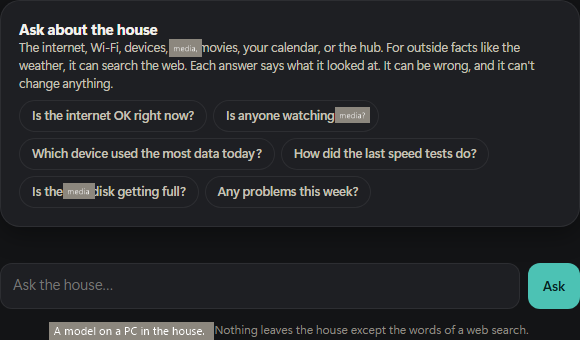
A bake-off on real questions
The research pointed to a newer, smaller model than the one in the original plan. Rather than trust the research, we tested. Two models answered the same 20 real questions about the house, using the hub's read-only tools.
The smaller model won clearly. It scored 36 of 40 against 33, answered in about a second instead of 2 to 3, used 4.8 GB of the 8 GB graphics card against 6.4, and made up nothing. The larger model invented two facts, including a Wi-Fi switch the hub doesn't have. For a tool people will trust, that settles it.
Hardware surprises
The graphics card was fine. The disk wasn't. Loading a model from the PC's older spinning disk took 50 to 75 seconds. From the solid-state drive, it took 8 to 12. The models moved to the faster drive.
Even then, a cold start failed once. Loading took 89 seconds, and with the answer on top of that, the hub's two-minute limit cut it off. Now the hub loads the model as a separate step, showing a live count, and starts warming it up as soon as someone opens the Ask tab.
Testing the failure
We also tested what happens when the AI isn't there. With its machine off, the Ask box says so in one line, and nothing else in the hub changes. That drill found one real flaw: the control panel waited 4 seconds for the sleeping machine before giving up. It now waits 2.
What it does now
Asked whether anything was streaming during a test, it answered "one stream, transcoding, 3.9 Mbps" in about a second once warm. Each morning, it writes a short note about the house, built only from facts in the hub. Voice questions and a "think harder" button are on the later list.
The order I'd do it in
Rules before the model: what data it can see, whether it can act, and where it runs. Then a test on real questions, counting made-up answers as well as good ones. And everything has to keep working with the AI switched off.