Blog · A home network run like a small office
The drill that found the bug
I unplugged the internet on purpose. The alert never reached my phone.
In this series · Chapter 3, MonitoringShow all 49 partsHide the list
1. Where it started
- 01Why I'm running my home like a small office
- 02What a read-only audit of my network found
- 03The first changes, and the ones I said no to
- 04Reuse first, build only what's missing
- 05Fifteen decisions before the first line of code
2. Remote access and keys
- 06One way in from outside
- 07An address that keeps itself up to date
- 08Where the passwords live
- 09Keys that can do one thing
3. Monitoring
- 10Is it my network or the internet provider?
- 11A watcher outside the house, and backups I've restored
- 12The drill that found the bug
- 13Alerts that only reach my phone when something needs me
- 14I had the monitor audit itself
- 15Teaching the hub to stop crying wolf
4. The network redesign
- 16"Don't take down my internet": the routine before every change
- 17The firewall upgrade, two days late
- 18Keeping the plan when the builder wanted to drop it
- 19Two Wi-Fi drops, and knowing when to stop
- 20The router at 90 percent
- 21Moving 40 gadgets without touching each one
5. The media server
6. The control center
- 24An overnight prototype, and bars instead of dials
- 25A nice hub, tucked away in a drawer
- 26Instructions for a phone I don't own
- 27Three checks before anything goes live
- 28Buttons with a seatbelt
- 29Rewind: replaying a Wi-Fi outage
- 30"I just want a more sensible layout"
7. Security
- 31A security scoreboard that started at a D
- 32Who's knocking: a security tab in two evenings
- 33Matching every program to the public flaw lists
- 34A DNS log for the house
- 35A weekly scan that can't annoy anyone
- 36The week of the scary flaw list
8. A private AI assistant
9. How the work got done
- 38Keeping a non-developer in charge
- 39A house manual that rebuilds itself every night
- 40My AI assistant keeps blocking itself, and I'm glad
- 41What it cost, what's next, and what I'd bring to an office
10. After the rebuild
- 42The backup that filled its own disk
- 43Two messages, one second, wrong order
- 44My help tool said "fine" at 7 megabits
11. Groceries
On the evening of October 11, I unplugged the cable between the modem and the router, on purpose, for about six minutes. The point was to see what the house would do during a real outage. It found a problem I would never have found otherwise.
What worked
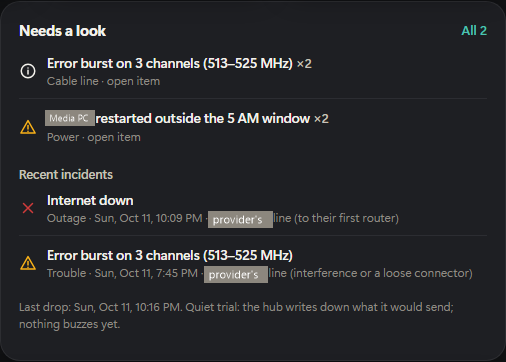
My AI coding assistant can't work without the internet, so we set up a watcher on another PC to record everything. The hub opened an incident within 3 seconds. The outside watcher noticed the silence at 10:12 PM and the recovery at 10:16, and both of its messages reached my phone.
What didn't
The hub's own "internet down" alert never arrived. The hub sent it through the home automation platform, and that platform delivered phone alerts through its maker's cloud. With the internet down, the cloud was unreachable, and there was no local path to the phone. The alert I'd built for outages couldn't work during an outage.
The drill turned up two more bugs. The hub blamed the provider's line, because the modem's status page comes back about 45 seconds before the line itself does. And the alert text included two sets of instructions where it should have had one. The fix for those shipped in the next release, built around one idea: the first minute decides the verdict.
Proving the fix took three tries
The fix was to use the phone app's local connection, which works over the house Wi-Fi without the internet. Proving it meant blocking the home automation machine's internet access for 3 minutes, sending an alert, and checking my phone.
The first test didn't count. The rule meant to block the connection used a type of block that this device doesn't support, so nothing was actually blocked. With the right kind of block, the cloud stopped answering, and a counter on the connection proved no traffic got through.
The second test reused the first test's label, so the phone probably just replaced the old alert with the new one, and I couldn't tell which I was looking at. The third test got its own label, with the time in the title. At 12:01 AM, I wrote back "yes got test 3." An outage alert can now reach my phone with the internet down.
Why drills matter
Every part of this had passed its tests. The alert worked whenever the internet worked, which is every time anyone checked it. Only cutting the internet on purpose showed that the outage alert depended on the internet.
The way the tests failed taught me something too. Two of three attempts would have looked like passes if nobody had asked how we knew. A test that can't fail isn't a test.
It only took six minutes with a cable unplugged. If you try it, pick a quiet time and check three things: the alerts arrive, they say the right thing, and they don't depend on whatever you just broke.